
Step 4: Initiating a Non-DOT Drug Test after Online Offer was Accepted
Description
• This job aid will explain and demonstrate how the non-DOT drug test is automatically initiated when your candidate is moved into the status Offer Accepted
Process Overview
- This process replaces the recruiting user manually placing drug screen orders in the i3 screen system
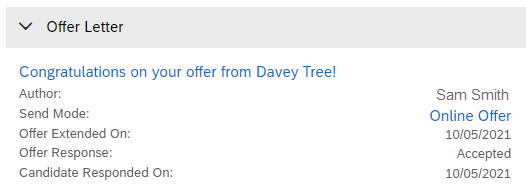
- This is a new process that will automatically send out a drug screen order and scheduling link to candidates when they meet the following criteria: sitting in Offer Accepted status; external candidate; applying for a US job; listed anticipated start date of less than 30 days
- IMPORTANT! You must have an official online acceptance prior to moving your candidate into Offer Accepted; this keeps the company in compliance during audits and aligns with Safety’s policies
Exceptions
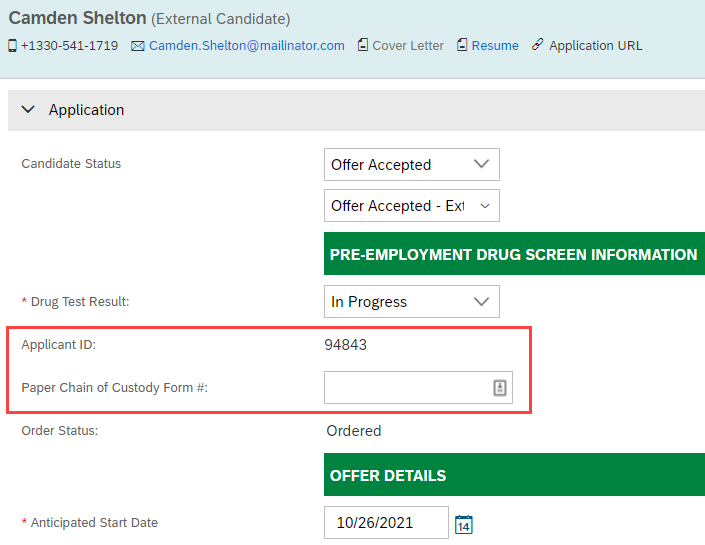
- Paper Chain of Custody Forms - For states that require paper chain of custody forms, the applicant ID will need to be written on the paper form before it is given to the candidate (applicant ID field is found on the candidate’s application during the Offer Accepted status); please tell your candidates to ignore the scheduling email in this case
- CDL and CDL Permit holders ONLY – The drug screen package for these candidates will still need to be created manually in i3; please tell these candidates to ignore the scheduling email in this case
Help & Support
• Additional questions about drug screen results, expired cases, and specific situations should be directed to the Safety team at mcsadministrativereporting@davey.com.
• If you need additional help with the recruiting process, please reach out to the recruiting team at recruiting@davey.com.
Initiating a New Drug Screen
| Step | Action | Screenshot |
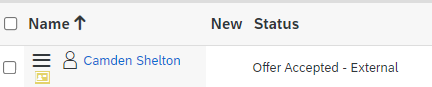
| 1 | After you have received an official online offer acceptance from the candidate, move them into the status Offer Accepted. |
|
| 2 |
SuccessFactors will now automatically check if the candidate is eligible for a drug screen.
|
 |
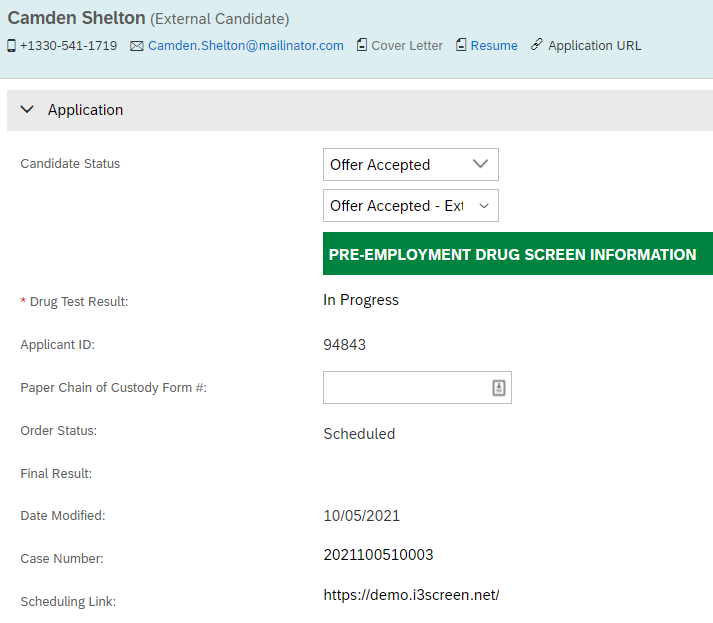
| 3 | If the candidate is eligible for a drug screen, the candidate’s application will display order details within 15 minutes of moving the candidate into the Offer Accepted status. |  |
| 4 |
The candidate will schedule their drug test through the scheduling email sent. When they have completed scheduling, they will receive their donor pass to take to the lab.
|
 |
| 5 |
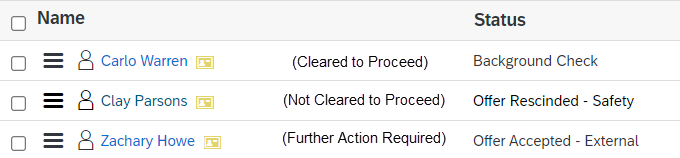
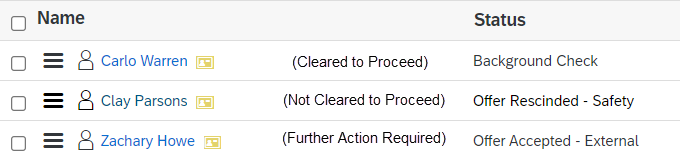
When the final result is ready, it will be visible in the candidate’s application. The candidate will automatically move to the next applicable status based on the final result.
|
 |
Exceptions: DOT Candidates - CDL and CDL Permit holders ONLY
• DOT packages for CDL and CDL Permit holders are not available to kick-off
automatically through this integration
• Please tell your candidate to ignore the scheduling email in this situation
• Manually create your order in i3 for this package, and communicate with safety to
clear your candidate in the requisition when the results are ready
Exceptions: Paper Chain of Custody Forms
• Some states, such as Florida, require a paper chain of custody form for the drug screen
• In these situations, the order will still be created automatically, but the candidate should ignore the scheduling email
• To ensure the result is still returned to the candidate’s application, write the applicant ID on the paper chain of custody form prior to giving it to the candidate
• A box to record the paper chain of custody form number is also available on the candidate’s application
| Step | Action | Screenshot |
| 1 | Move the candidate to the status Offer Accepted after you receive the online offer acceptance. | 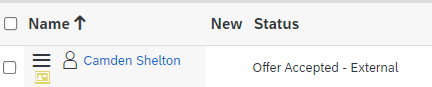 |
| 2 |
When the candidate is within 30 days of the anticipated start date, the order will be created Write the applicant ID on the paper chain of custody form before providing it to the candidate. Record the paper chain of custody form number on the candidate’s |
 |
| 3 | The lab will use the applicant ID to look up and merge the open order. This allows the result to come back to the candidate’s application as normal. |
 |
FAQs for Drug Screen Process
Q. How does this new drug screen process help me?
A. The system will automatically create orders for eligible candidates within the requisition, which cuts out the need for manual orders to be created by the hiring manager or recruiter
A. In-progress updates can be viewed in the system to help the hiring manager or recruiter understand where the candidate is in the drug screen process
Q. How will the system know when to create a drug screen?
A. The system checks that the candidate meets the following criteria:
o Currently in the Offer Accepted - External Status
o External Candidate
o Applying for a US job
o Anticipated Start Date in offer details is within 30 days
Q. Will the candidate be reminded to schedule if they forget or miss the scheduling email?
A. The candidate will receive 2 scheduling reminder emails
Q. What if my candidate needs help scheduling after the order is created?
A. You can login to i3 to view pending orders and finish the scheduling portion on the candidate’s behalf
Q. What if my candidate doesn’t schedule/can’t go within the allotted time frame, and the order expires?
A. You will need to email the safety team for a new online order to be created from SuccessFactors. They can be reached at mcsadministrativereporting@davey.com.
Q. Can I move my candidate forward in the requisition before the final result comes back?
A. No, the system will prevent you from advancing the candidate if you do not have a final drug test result
A. This aligns with Davey’s policies around requiring a negative drug test prior to moving into onboarding
Q. What are the possible final results?
A. Cleared to Proceed, Not Cleared to Proceed, or Further Action Required. See the chart on the next page for an outline of each result
Q. How will I know when the results are returned?
A. The hiring manager and recruiter will receive a notification with basic final results via email. The email will also include which status the candidate is sitting in, and next step action items
Q. What if I am in a state (or use a lab location) that requires paper chain of custody forms?
A. The electronic order will still go out, but the candidate should ignore the scheduling email. You will need to write the Applicant ID on the form prior to giving it to the candidate. This unique ID will be used at the lab to merge the orders. You will also want to record the paper chain of custody form number in the candidate’s application for future reference.
Drug Screen Result ChartAfter the lab has processed a candidate’s test, the final results will be returned to the |
Final Result |
Status Movement |
Next Steps |
Cleared to Proceed
|
•Candidate is automatically moved to Background Check status | •Recruiting user receives result email from system •Recruiting user can now initiate background check, and move candidate forward to onboarding |
Not Cleared to Proceed
|
•Candidate is automatically moved to Offer Rescinded –Safety status | •Recruiting user receives result email from system •Recruiting user will now notify the candidate that they will no longer be considered for this position due to drug screen results |
Further Action Required
|
•Candidate remains in Offer Accepted – External status | •Recruiting user receives result email from system •Recruiting user reaches out to safety for further guidance and instruction |



Comments
0 comments
Please sign in to leave a comment.